Mr. Levine’s
4th Period
Web Design Class
1st Quarter 2005-2006
Wednesday, October 19
Assignment #1
Introduction
to HTML
5
points
The
class will spend a few days learning the nuts and bolds of web page design by
exploring HTML (Hypertext Markup Language). You’ll be using Notepad to create
“raw HTML” so that you understand how web pages are put together.
Follow this link for the assignment
Monday,
October 24
Assignment
#2
Introduction to Web Page Design
3 points
It’s important to learn about good design practices. The web
sites below give examples of good and bad web design:
Web Pages That Suck
Making Usable Web
Pages
Top Ten Web Design
Mistakes of 2005
The HTML Hell Page
After
reviewing some of this information, think about one or more web sites you
think are well done or badly done. Write at least a paragraph about why the
web site is good or bad. Include a link to the website.
When
you’re done, copy your assignment into my 4th period inbox
Tuesday, October 25
Assignment
#3
Introduction to DreamWeaver
4 points
Now that we’ve done some preliminary learning we finally move
on to using a dedicated web design tool: Macromedia DreamWeaver.
You’ll start out by creating a Dreamweaver web site (a place
to put web pages) and then you’ll experiment with Dreamweaver.
Do the following two activities:
1)
Create a simple web site
in Dreamweaver
2)
Create a simple
web page in Dreamweaver
Your page needs to have a heading, some text, a bulleted list,
and a hyperlink to another place on the web.
When you’re done, let me know and I’ll check off your work
Wednesday,
October 26
Today is a short day. Finish yesterday’s assignment and experiment with
Dreamweaver.
Thursday,
October 26
Assignment
#4
Adding images to a web page
Adding another page and linking to it
4 points
You’ll continue playing in the sandbox today.
You need to do three things:
1) Add a picture to your web page. Read this lesson to find
out how:
Adding an Image to a Web Page
2) Add a new page to your web site
To add a new HTML page, use the New command on the File
menu.
Put something fun or interesting on that page. Play around a
bit with Dreamweaver. Don’t worry, you won’t break anything!
3) Make a link between pages on your web site
In the last assignment you made a link to a page that is outside
of your web site. For this assignment, make a link to a page inside
your web site.
Highlight some text that you want to turn into a link. Then
click on the yellow folder next to the Link box. This will let you pick a
file in your web site to be the target of the link.
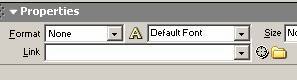
Also, start thinking about what you want on your home page.
See tomorrow’s assignment (below).
You page needs to have at least one picture on it.
When you’re done, let me know and I’ll check off your work
Friday,
October 28
Assignment
#5
Design Your Personal Web Site
Due Tuesday, November 1
4 points
Today you’ll start designing a web site for yourself. For now,
this page will focus on your personal interests. It’s a way to introduce yourself
to other people. Later you’ll turn it into an online portfolio where you show
who you are now and what your future plans are.
The assignment is to describe what you want to have on your
web site. The web site must have a main page that is linked to at least two
other pages. Those other pages must link back to the main page.
You can put whatever you want on your web site as long as it
isn’t objectionable (violent or obscene). However, your finished web site
must be professional looking with good spelling and grammar.
You will send me a Word document that looks something like
this:
David Levine’s Web Site
My web site will have three pages.
Page 1 (home page):
Title: David Levine: Teacher and bicyclist
My photo and a brief introduction.
A picture of some bicycles because I like bicycling
Links to the other two pages
Page 2:
Title: Bicycles for Fun and for Commuting
Description of the Cascade Bicycle Club and how it has fun bike
rides and also help people who bicycle to work and for school.
More photos of people in bicycles.
A link back to the main page
Page 3:
Title: Mathematicians Who Break the Mold
Talk about mathematicians who don’t fit the typical image of
an old man with wild hair. Describe people who like math but are not white
European males.
Include photos of these people.
A link back to the main page
When
you’re done, copy your assignment into my 4th period inbox
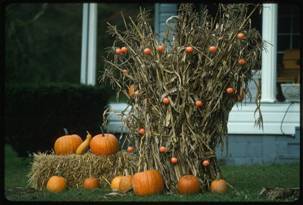
Photo
Credit: House in Horse Creek decorated for Halloween, photo by Lynthia Scott
Eiler, 1996. Library of Congress, Archive of Folk Culture, American Folklife
Center. Downloaded October 30, 2005 from
http://hdl.loc.gov/loc.afc/afccmns.lec15912.
Monday,
October 31
Assignment
#6
Build Your Personal Website
Due Friday, November 11
12 points
Once you’ve decided what will go in your website, you’ll
actually build it using Dreamweaver.
In the future we’ll spend more time designing how your
websites will look. We’ll use Macromedia Fireworks to make a graphic design
of each page. Because you’re new to Dreamweaver we’re not going to worry too
much about exactly how the website looks for this assignment.
Use Dreamweaver and the design you made in assignment #5 to
build your personal website.
IMPORTANT: Your website will probably include pictures or images from
the Internet. Add every image to your design Word file (you turned
this in as assignment #5) along with the URL where you got it from. Later
this week you will learn how to legally credit the owner of the images (see the
photo above).
When you’re done, let me know and I’ll check off your
work
Monday,
November 7
Presentation:
Fair Use Guidelines.
As
mentioned above, your website needs to say where you got every photo that you
include.
Read
this for more information:
Fair Use Guidelines
|